
WordPress plugin
Live Pricing for Freemius
Freemius pricing, live on your own pages with blocks or shortcodes, in each visitor’s currency, refreshed so it never goes stale.
If you sell through Freemius, every price on your website is a copy of the price in your dashboard, and copies go stale. Live Pricing for Freemius keeps the figure in the page bound to the price in the dashboard: blocks in the editor, shortcodes everywhere else, prices fetched on your server, stored on your site and refetched within seconds of a change.
Blocks and shortcodes
Refreshed in seconds
Each visitor’s currency
Free on WordPress.org
Free on WordPress.org. No premium tier, no account, no licence key. WordPress 6.3 or later, PHP 7.4 or later.
The Problem
Prices typed into pages go stale
If you sell through Freemius, every price on your website is a copy of the price in your Freemius dashboard. Change the price in the dashboard and each page, tile and sentence that quotes it keeps the old figure until somebody opens it in the editor and retypes it.
A price on a page is a copy
A pricing page, a comparison table, a landing page and a figure quoted in a paragraph are separate copies of the same number. Miss one and a visitor is reading a price you no longer charge.
Freemius’s own plugin writes the price at publish time
Freemius for WordPress 0.5.0 writes the price into the page when the page is saved. Measured 2026-09-11: after a dashboard change the page kept the old figure until it was reopened in the editor and updated, and its own README says the front end does not call the Freemius API on every visit.
Every currency is another copy
Sell in dollars, euros and pounds and each figure exists three times over. A page cache holds one rendering of a page, so a server that picks the currency per visitor either gives up the cache or serves one visitor another visitor’s currency.
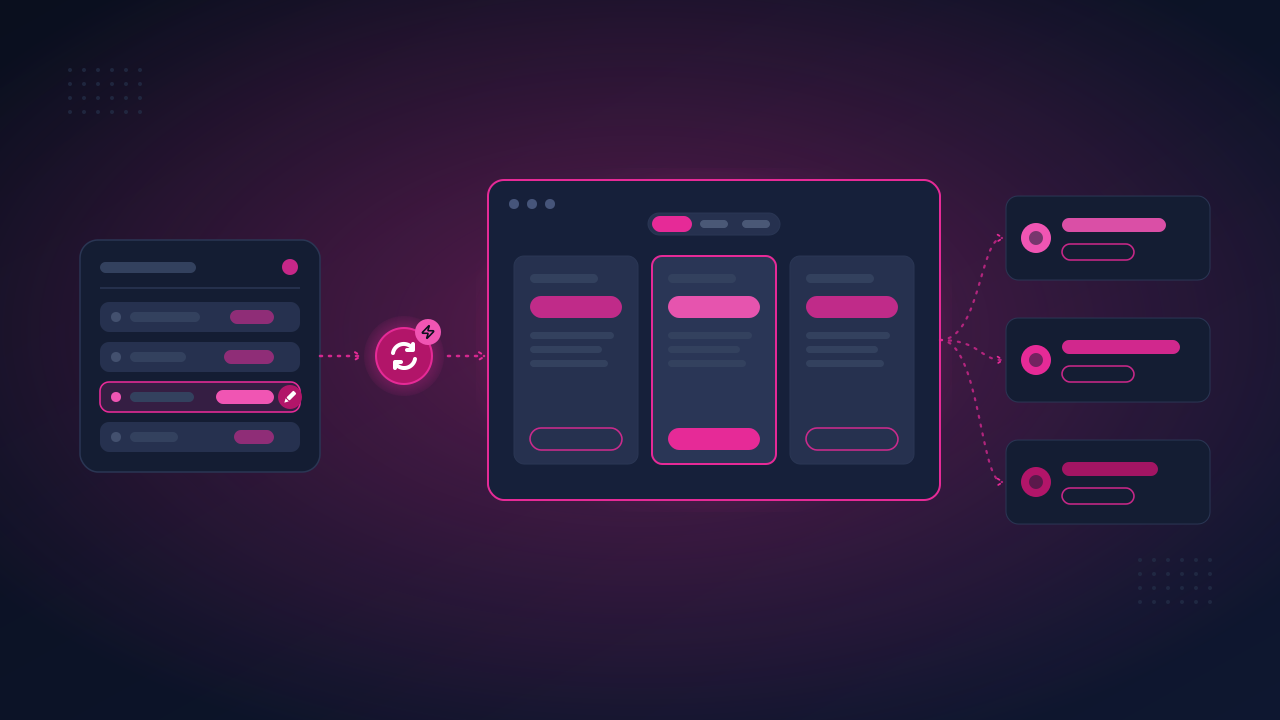
Live Pricing for Freemius keeps the figure in the page bound to the price in the dashboard. Prices are fetched from the Freemius API on your server, stored on your site and refetched within seconds of a dashboard change, so nobody has to re-save a page for a new price to appear.
The Solution
The page renders whatever the price is now
Instead of a figure typed into the page, the page holds a block or a shortcode, and the plugin renders it from a copy of your Freemius prices that lives on your own site and is kept current.
1
Connect
Add the product on the Products screen: its numeric Freemius product ID and its API Bearer Authorization Token, nothing else. The save fetches the prices and the product’s name, reads the secret key that signs webhooks, and registers the webhook with Freemius for you.
2
Fetch and store
Your server reads the product’s plans and prices from the Freemius API and stores them on your site. The webhook registers itself when you save, and a price change is refetched within seconds.
3
Render
Insert a Freemius price or Freemius buy button block, or put the pflp_price shortcode anywhere a figure belongs. Every currency ships in the page and the visitor’s browser shows theirs.
Nothing about this makes a visitor wait on an API call. Pages render the stored figure, so a slow or unreachable Freemius API cannot slow a page down, and if a refresh ever fails the last good prices stay on the page while an admin notice tells you.
Key Features
Everything a pricing page needs, kept live
Seven blocks, seven shortcodes, one renderer, and a copy of your prices that is refreshed the moment the dashboard changes.
Blocks and shortcodes, one renderer
Freemius pricing card, price, buy button, plan text, plan features, currency toggle and billing cycle toggle sit under Widgets in the inserter. The pflp_ shortcodes do the same thing anywhere else, through the same code, so the two can never drift apart. A shortcode converts to a block in one click, and back.
Refreshed in seconds
A webhook receiver refetches within seconds of a price or plan change in the dashboard. A staleness check is the backstop, and a daily job is the backstop for that.
Each visitor’s own currency
Every price carries all of its currencies, and the visitor’s browser picks theirs: their own choice, then their location, then your default. The toggle lists only the currencies a product is sold in, and renders nothing when there is one.
Checkout links that carry the currency
Buy buttons stay ordinary links to the hosted checkout and gain the visitor’s currency, whether the plugin rendered them or your theme did. One setting opens the checkout in an overlay instead.
The last good price wins
If the Freemius API is unreachable, the stored prices stay on the page and an admin notice tells you. Nothing goes blank, and no figure is ever invented or shown as zero.
Ready-made shortcodes
Every product’s plans and pricing rows are listed on its own screen, with a price shortcode and a button shortcode on each line to copy into a page.
A whole pricing card in one block
The Freemius pricing card arrives holding the plan’s name, its price, its features list and a buy button, every figure live and every one of them still its own block. The featured plan, its badge and the hover are set once on the Settings screen.
Buy buttons in Fill or Outline
A buy button comes in the two styles the core Buttons block offers, Fill and Outline, under the same names, and each style has its own hover colours. Everything else about how it looks is your theme’s.
See It In Action
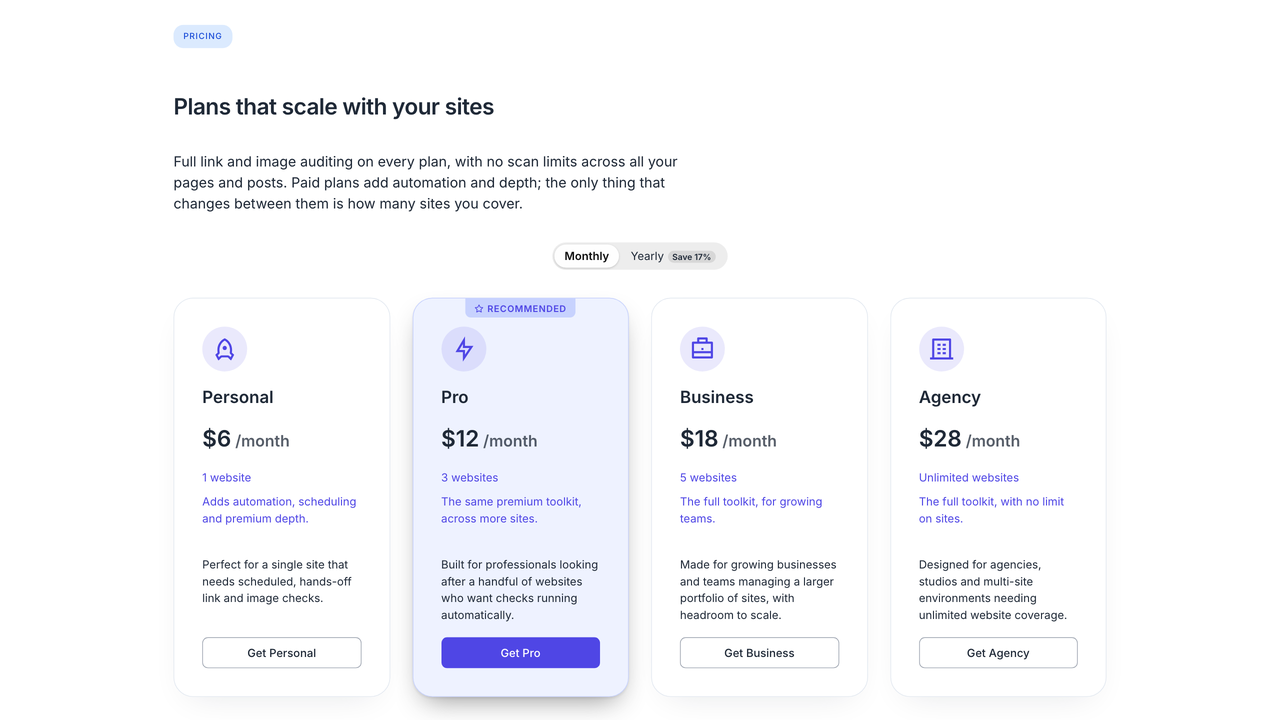
A price in a page, in the visitor’s currency
Put a price in a tile or in a sentence, add the toggle once, and the same page reads correctly in every currency you sell in.
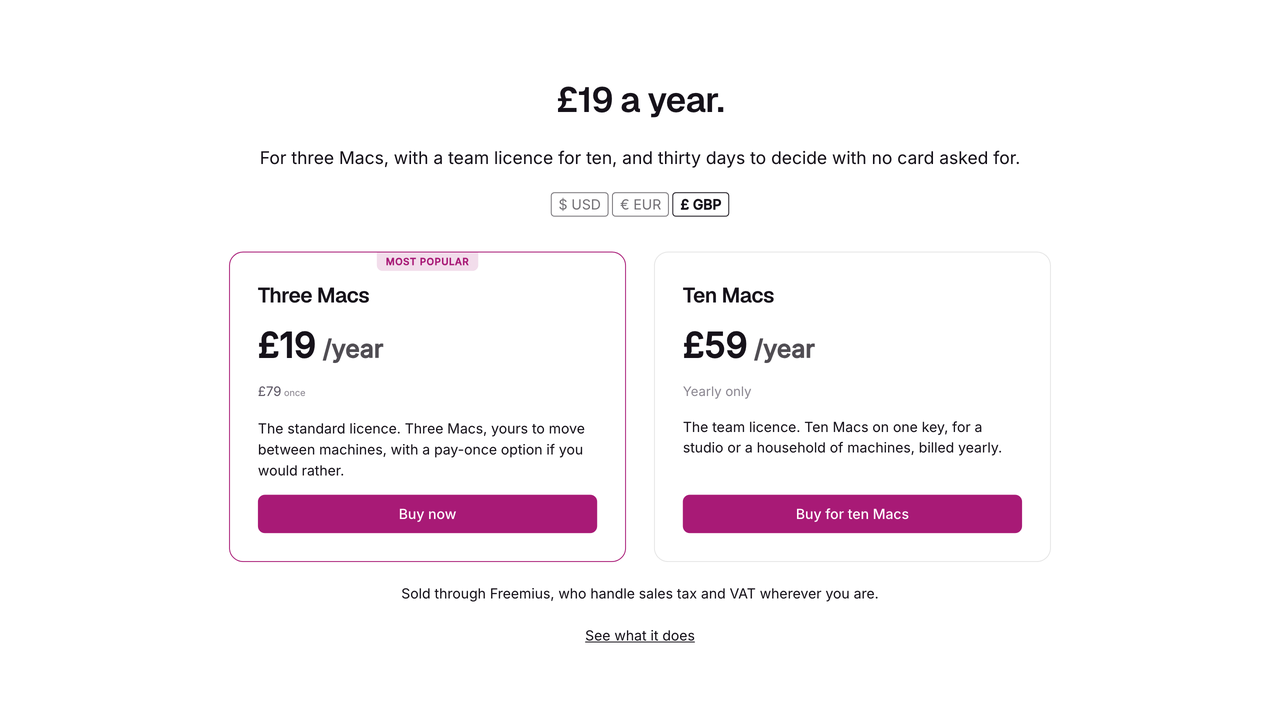
Live prices with the currency toggle
A pricing page rendered from the copy of your Freemius prices stored on your site: the headline figure, a buy button and the currency toggle, with no request to Freemius during the visit.
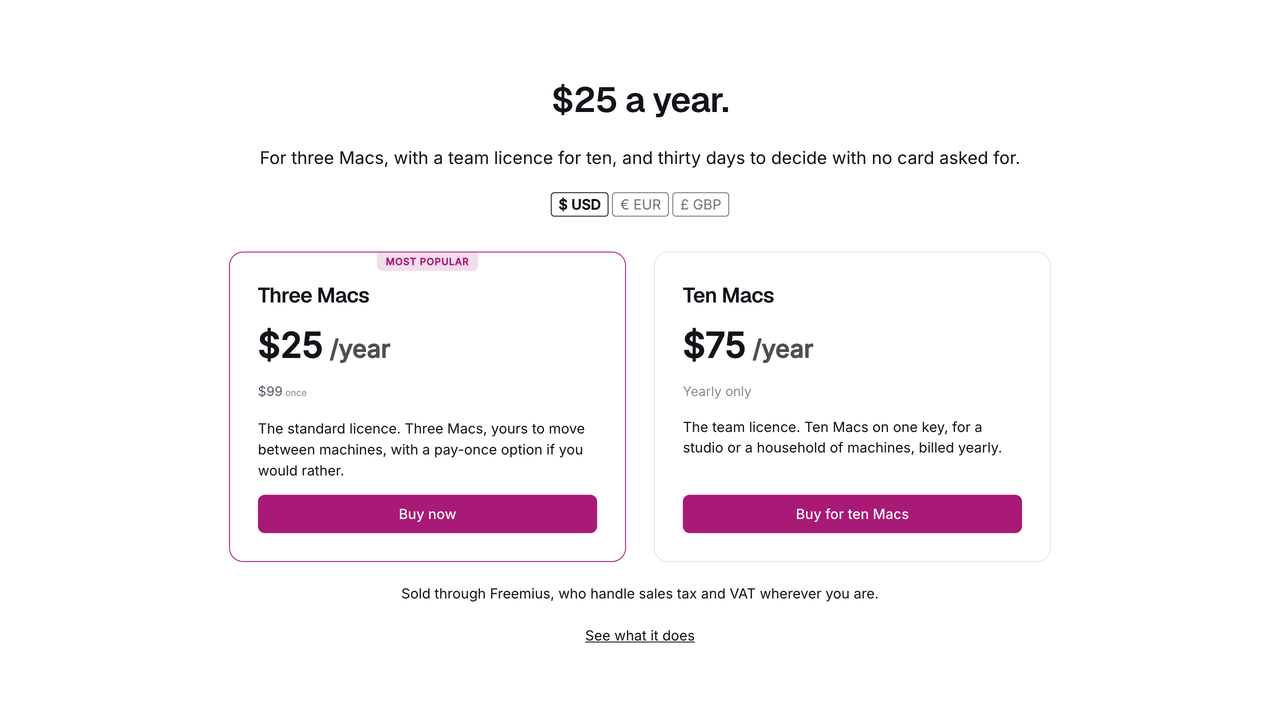
The same page in a second currency
The visitor’s browser swaps every price on the page to their currency, from data already in the HTML. No request comes back to your site, so a page cache or a CDN can never serve one visitor’s currency to another.
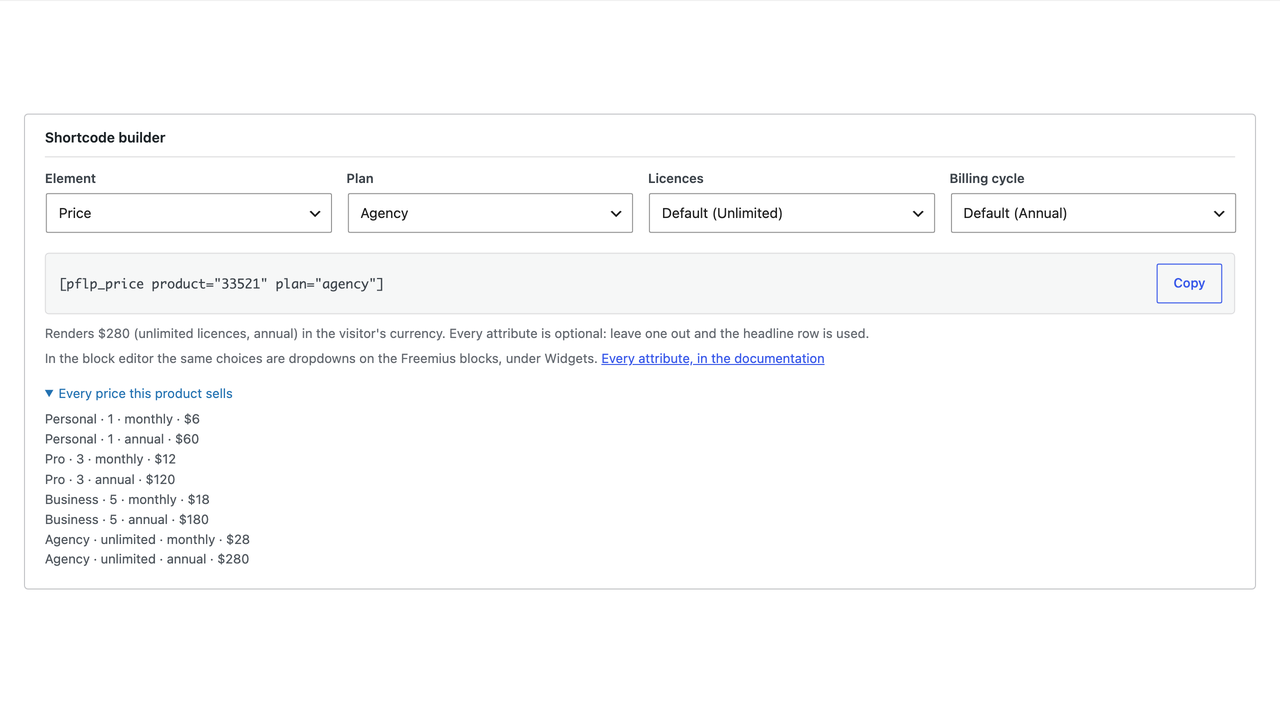
Copy the shortcode from the product’s screen
The Shortcodes section shows the shortest working form of each shortcode with what it renders for your product, then every plan and pricing row with a ready-made price shortcode and button shortcode on each line.
Pricing cards with a featured plan
A row of cards is an ordinary Columns block and each card is one Freemius pricing card holding its plan. The plan you mark featured in Freemius takes the badge, the border, the fill and the button, and every pricing page on the site follows within seconds of the change in the dashboard.
Set Up In Five Minutes
Four screens in the admin, most of the work in the Freemius dashboard
Freemius Pricing in the WordPress admin menu opens on Products. Settings holds the site-wide fields, with a Featured plan tab beside it for the card that carries your featured plan, and a Logs tab beside that. Add a product with its ID and its API Bearer Authorization Token, and the rest is on the page.
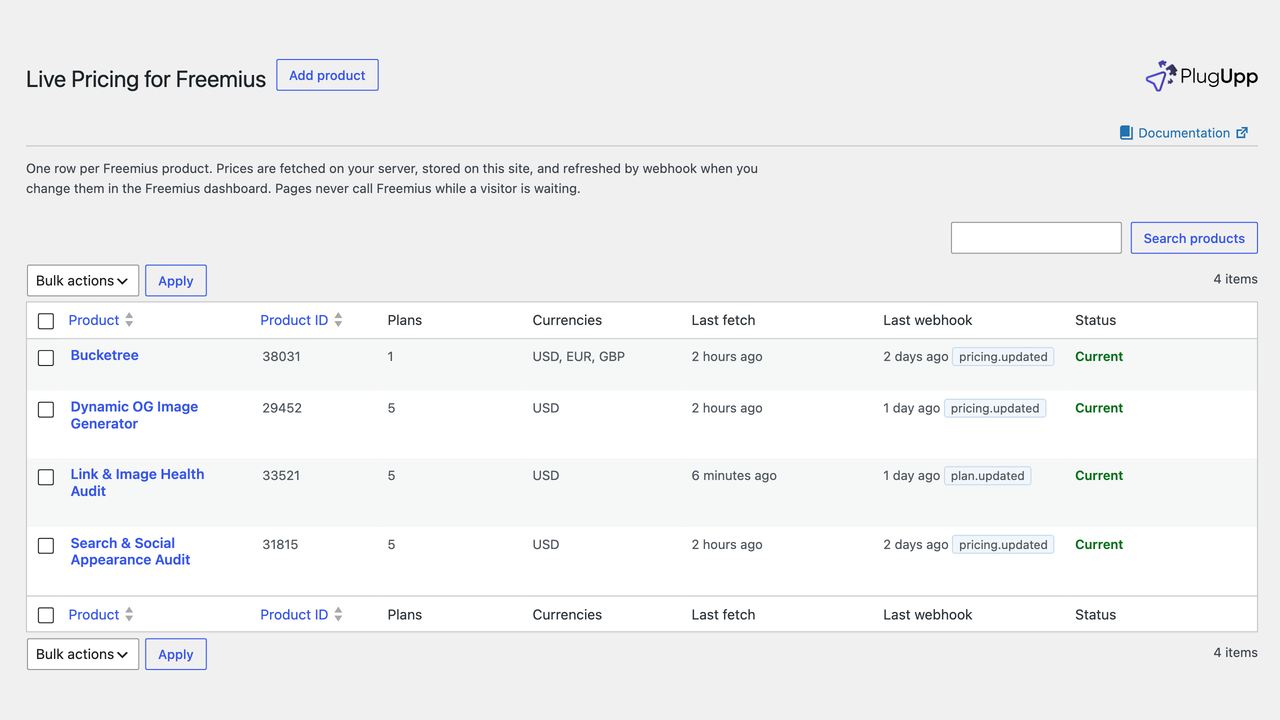
Products
One row per Freemius product, showing its plans, its currencies, when the prices were last fetched, when a webhook last arrived and whether the last fetch worked. Each row can be edited, refreshed or deleted.
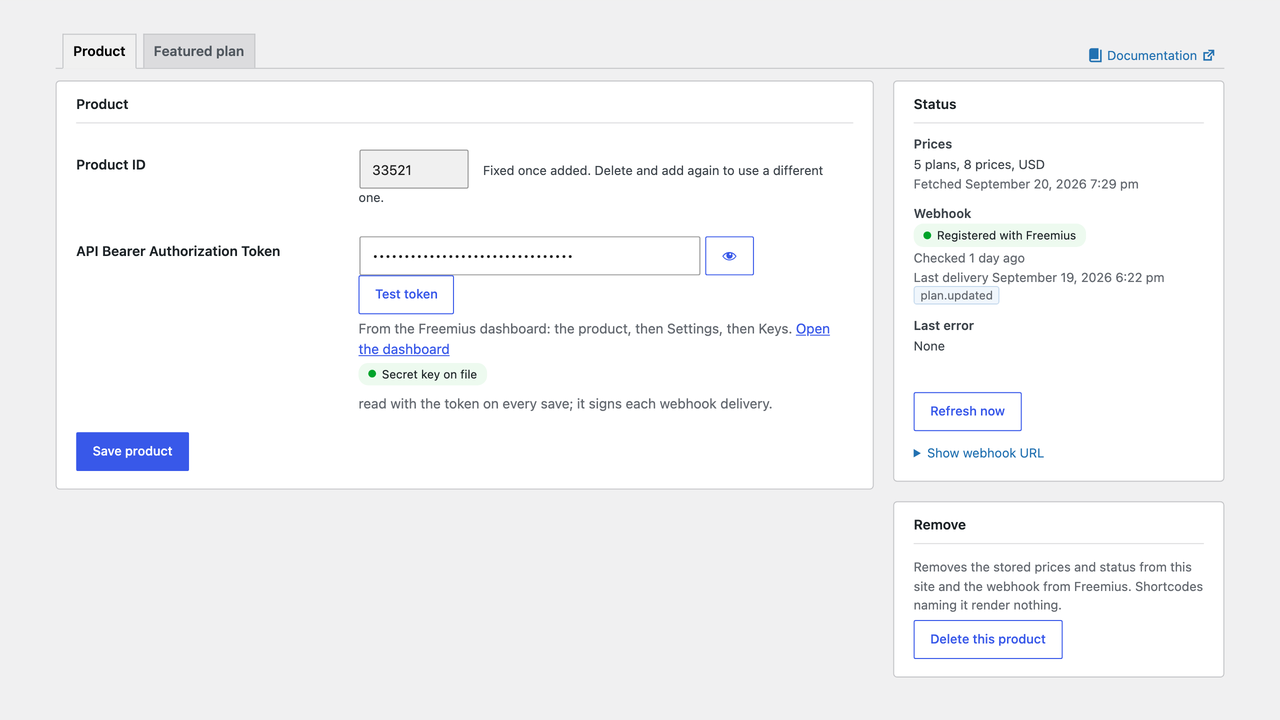
Keys and the webhook URL
A product’s own screen holds the API Bearer Authorization Token with its Test token button and the secret key on file. The webhook registers itself, and the Status list says so.
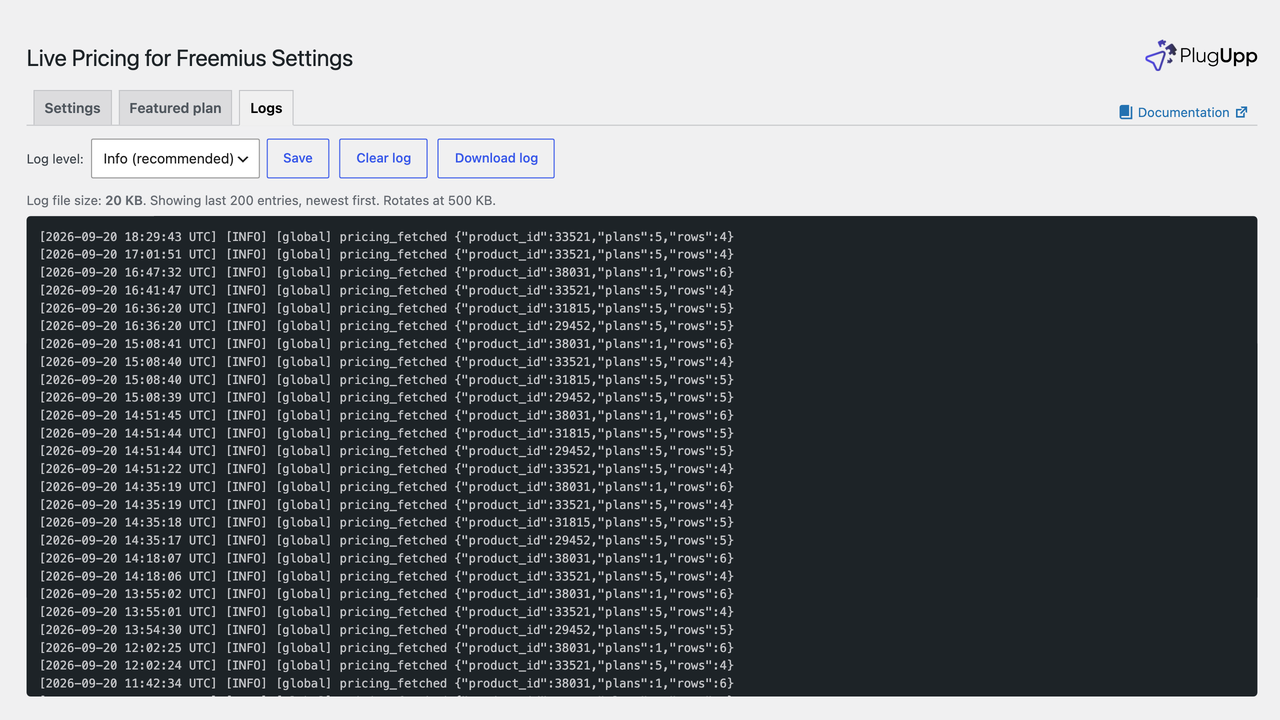
Logs
The Logs tab on the Settings screen shows what the plugin has been doing: fetches, webhook deliveries, and anything a shortcode asked for that could not be found.
Featured plan
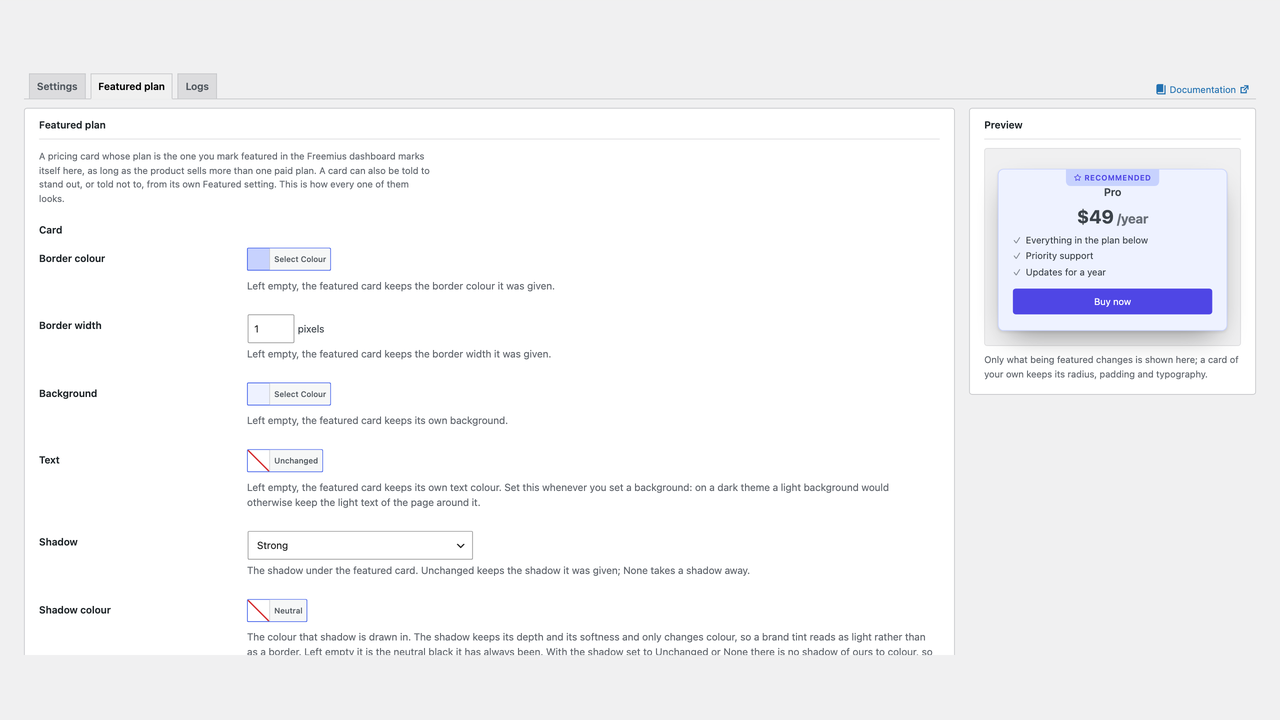
The Featured plan tab styles the card whose plan you marked featured in Freemius: its border, background, shadow and text, the badge and the buy button’s colours, with a live preview of the card beside the controls. Set once for the site, and any product can override it on its own Featured plan tab.
Pricing
Free, on WordPress.org
There is one version of Live Pricing for Freemius, it is free, and everything on this page is in it. No premium tier, no account, no licence key.
What you get
The whole plugin, in the one build on WordPress.org. WordPress 6.3 or later, PHP 7.4 or later.
Given away because everyone who needs it sells a plugin or theme through Freemius from a site of their own, which is exactly who PlugUpp builds for.
FAQ
Questions, answered
No. This plugin talks to the Freemius API directly and does not depend on any other plugin. The two can coexist if you already run the official one. The one thing it does to the rest of the page is add the visitor’s currency to any link pointing at the Freemius checkout, whoever rendered it, and open those links in the overlay if that setting is on. Nothing else on the page is touched.
No, but it is what makes a price change appear in seconds. Without it, a page view notices that the stored prices are older than the refresh interval you set and schedules a background refresh, and a daily job catches anything missed. The webhook URL is generated for you on the product’s own screen, and every delivery is checked against your product’s secret key before it is acted on.
Your prices stay exactly as they are. The stored copy on your site is only ever replaced by a successful fetch, so a failed refresh changes nothing a visitor sees. You get an admin notice saying which product could not be refreshed, and the reason is recorded in the log. A page never waits on the API, so an outage at Freemius cannot slow down or break your site.
Yes, and it is built for them. Prices are rendered into the page from the copy stored on your site, so a cached page is a correct page. The visitor’s currency is applied in their own browser from data already in the HTML, with no request back to your server, so a cached page can never show one visitor another visitor’s currency.
Both, and they are the same thing. Seven blocks under Widgets in the inserter: Freemius pricing card, price, buy button, plan text, plan features, currency toggle and billing cycle toggle. They are dynamic blocks rendering through exactly the same code as the shortcode of the same name, so a price in a block and a price in a shortcode can never disagree. A Shortcode block converts to the matching block in one click, and a block converts back the same way; the card is the one that does not, because it holds other blocks rather than a figure.
Nothing is shown for it, and a warning goes to the log naming which shortcode asked and what could not be found. A price leaves a gap and a button is not rendered at all, because a link to a checkout that sells nothing is worse than no link. Showing a zero, or falling back to another row’s price, would put a wrong figure in front of a customer.
No. The front end is measured against ten themes, block and classic, and every element the plugin renders occupies exactly the footprint the equivalent core block would occupy in the same place: it never takes space from a neighbour, moves one or restyles one. A plain price, a plain card and a plain buy button are left weak on purpose so your own styling flows in, and the things you asked for by name, the toggle styles, the featured card and the hovers, win by being more specific. Nothing is forced with !important except a property a theme is measured to force that way itself, and every one of those is recorded against the theme and the rule that forced it.
Put the live price on the page, once.
Live Pricing for Freemius binds the figure in the page to the price in your Freemius dashboard, in each visitor’s currency, refreshed within seconds of a change. Free on WordPress.org.
No premium tier, no account, no licence key. WordPress 6.3 or later, PHP 7.4 or later.
