
Guide
How to preview your WordPress pages in Google search results, all at once
A SERP preview for every page on your WordPress site at once: each title and description as search engines read them, with truncation, missing fields and what to fix first.
Published June 24, 2026 in Guides
Most SEO plugins show a SERP preview for the page you are editing: one title, one description, one snippet, while that page is open. Nobody sees the whole site that way. This guide shows how to preview every WordPress page in Google search results at once, with each title and description as search engines read them, so truncated titles, missing descriptions and stray noindex tags turn up in one list instead of one page at a time.
Why a one-page SERP preview misses most of your site
What search engines read is the page that ships, whatever produced it: the theme, a page builder, your SEO plugin or custom code. That rendered page is the version worth previewing, on every page at once.
PlugUpp Search & Social Appearance Audit is the audit of that output. It is not an SEO plugin and does not manage your metadata. Whichever tool produces your titles and descriptions, it reports what actually ships on each page, with the evidence. Treat it as a second opinion on what your SEO plugin produced, not a replacement for it.
A SERP preview for every page on one screen
Install the free plugin from WordPress.org and activate it, then open Appearance Audit in the admin menu. Until your first scan has finished, the Dashboard shows a single step, Scan your site. Press Scan now. The plugin renders each of your pages the way a visitor’s browser would and reads the metadata that actually ships.
Discovery is a simple list of your own content, so it never crawls, spiders or follows links. The free plugin audits every page and post, plus your archive pages: the blog home, category, tag and custom taxonomy archives, and monthly date archives. Private and password-protected pages are left out, because search engines can never see them.
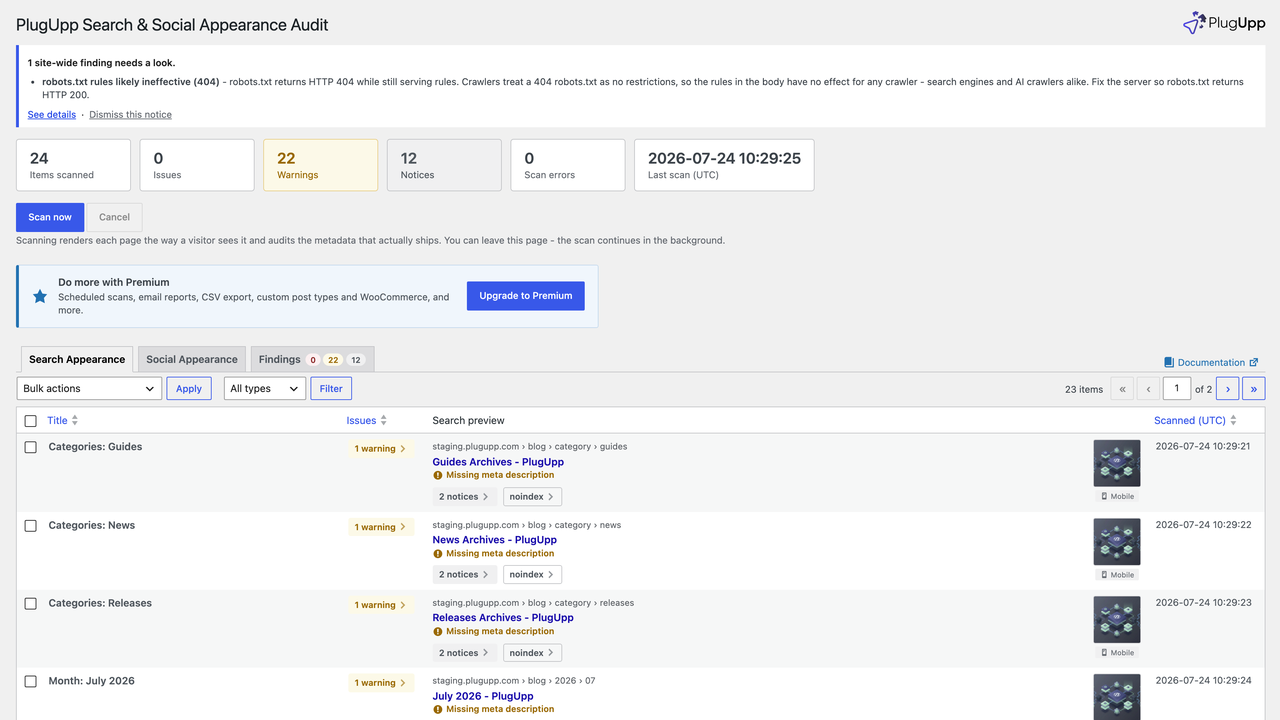
The Search Appearance tab is the SERP preview for the whole site. Each row is one page shown as a Google-style mobile result, with its breadcrumb, title, description and thumbnail, the Issues badge alongside and any Warning, Notice and Robots flags on the card. The thumbnail is indicative, because Google chooses its own image and may show none.
What the SERP preview flags: truncated, missing and conflicting fields
Hover any title or description to read the full text where the card truncates it. Behind the preview, every page is checked for:
- Title: missing, or more than one title tag on the page.
- Meta description: missing, duplicated or conflicting; too long for your preview length, so search engines will truncate it; or so short it makes a weak snippet. The preview lengths are under Settings, in the Previews group.
- Canonical: missing, duplicated, not an absolute URL, or in conflict with a noindex.
- Robots: a page set to noindex, or to
max-image-preview:none, which stops Google showing a thumbnail for it. Both are deliberate on some pages, so they are flagged for you to check rather than treated as errors. Directives are read from the page’s robots tags and from itsX-Robots-Tagresponse headers, which never show up when you view the source.
A page with no description is told so plainly: no meta description was found, so search engines will compose their own snippet. Every finding carries the exact value taken from the rendered page, the title, description, canonical URL or robots directive that shipped, so you are never guessing at what the audit saw.
What to fix first after a SERP preview audit
Pages are sorted by severity, critical first, then warnings, then notices, so the pages that need attention are always at the top. The Findings tab lists every page with something flagged, with its area, a one-line summary and separate Issues, Warnings and Notices counts.
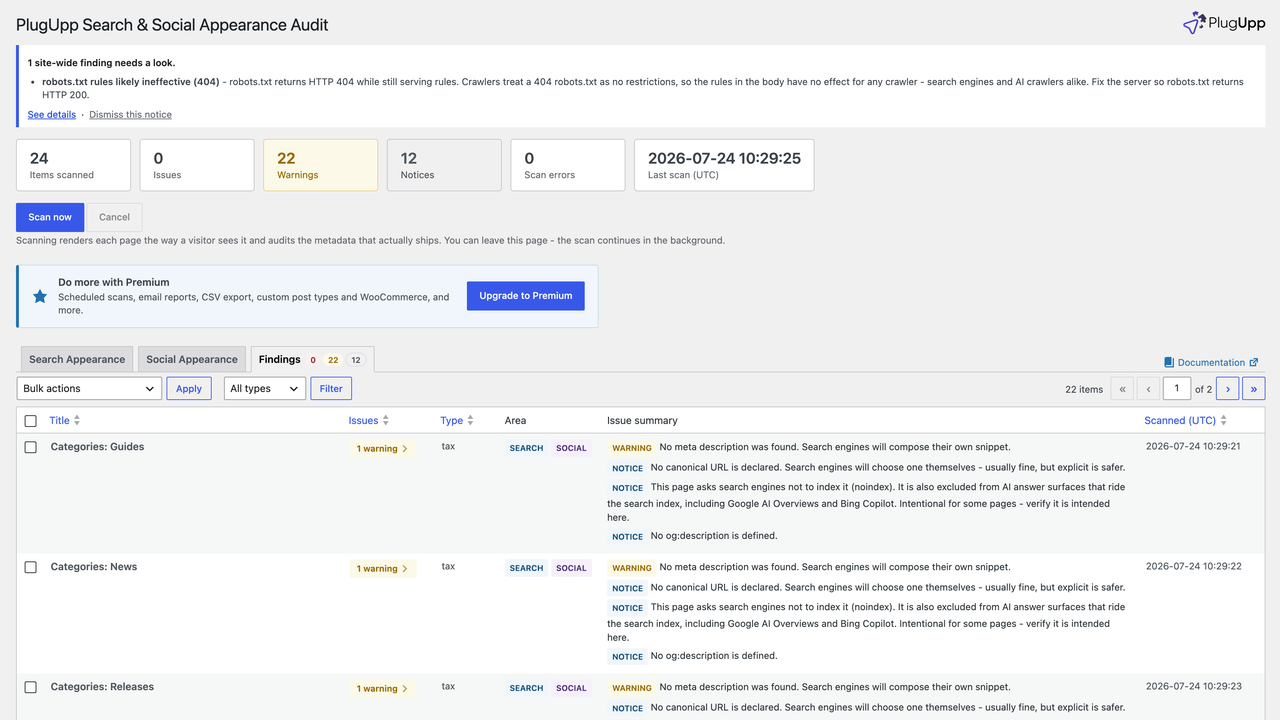
Three things deserve your attention before the rest:
- The Site checks row. If “Discourage search engines from indexing this site” is left on under Settings, Reading, WordPress adds a noindex tag to every page and none of them can appear in search results. On a live site nothing else in the audit matters until it is cleared.
- Pages that are noindex by mistake. On a page set to noindex, findings about how it would look in a search result are listed as notices, because the page cannot appear there. Check the Indexable or noindex flag first: remove a noindex from a page that should be found, and its search findings return to their normal severity.
- Findings that repeat across a whole content type. When the same heading finding covers most pages of one type, a notice above the results says so, because the cause is usually the template. Fixing the template once clears every one of those rows.
Fix each page at the source, then re-scan it
Click any badge, or any row on the Findings tab, to open the details popup. It shows each problem with its evidence and three actions: View page, Edit page, and Re-scan, which re-audits that one page on the spot so you can confirm a fix straight away.
If a finding is deliberate, a noindex you meant to set for example, ignore it on that page or sitewide. It stays visible, greyed out, and stops counting. The plugin itself is read-only: it never edits your posts, settings or metadata.
Paid plans add scheduled scans, email reports and a Changes since last scan view listing what was newly flagged, fixed or edited since the previous full scan.
Search results are one half of how a page is seen. When the same page is shared, platforms build a card from its Open Graph tags instead, and How to check your Open Graph tags before you share a page covers that side, which the same scan audits on the Social Appearance tab. For AI answer engines, see Is your WordPress site ready for AI search? What to check.
PlugUpp Search & Social Appearance Audit is free on WordPress.org, with no scan limits on your pages and posts. Install it, press Scan now, and the SERP preview for your whole site is one tab away.

About the plugin
Search & Social Appearance Audit
See exactly what search engines and social networks will see.
Accurate local rendering
Search & social previews
Theme & SEO-plugin agnostic
Free + Premium versions
