
Guide
A broken link checker that runs on your own server, with no quota
A broken link checker that runs on your own server, with no quota: rendered pages, fewer false positives, and scheduled scans and email reports on Premium.
Published July 17, 2026 in Guides
Every site collects broken links. Pages you linked to move or close, a product is discontinued, a menu still points at a page you deleted last year. Finding them is the job of a broken link checker, and how the checker does that job decides what it costs you: in money, in privacy, and in time spent chasing links that were never broken. This is the case for one that runs on your own server, with no quota.
What a quota-based broken link checker costs you
Many checkers are services. They crawl your site from servers of their own, or meter the work: so many pages a month, so many links a scan. That shape has costs that turn up later.
- The quota decides what gets checked. On a growing site the limit arrives before the last page does, and the links on the pages left out are the ones nobody looks at.
- Your pages leave your site. A crawler run from someone else’s server reads your pages there, and what it finds sits on their systems rather than yours.
- False alarms cost time. Plenty of large sites refuse automated requests while serving people normally. A checker that calls every refusal broken sends you off to check links that work.
- The database is not the page. Most checkers read links out of your database, so links added by the theme, menus, widgets, footers and page builder are never checked at all.
A broken link checker that runs on your own server
PlugUpp Link & Image Health Audit does the whole job on your own server. There is no external crawler and no per-link quota, so you can scan as much as you like. To check an external link, the plugin requests that address directly from your server, but only addresses that already appear on your pages, and only to read the response. Internal links are checked against your own site. No page content or link data leaves your site unless you turn on the premium Safe Browsing check, which sends external addresses to be checked against malware and phishing lists, with your own API key.
It never crawls. It audits only your known WordPress content and the links and images those pages output, and never follows links to discover new addresses. It is read-only as well: it never edits posts, settings or metadata. The free plugin on WordPress.org is fully functional with no limits.
Every page and post, including what your theme adds
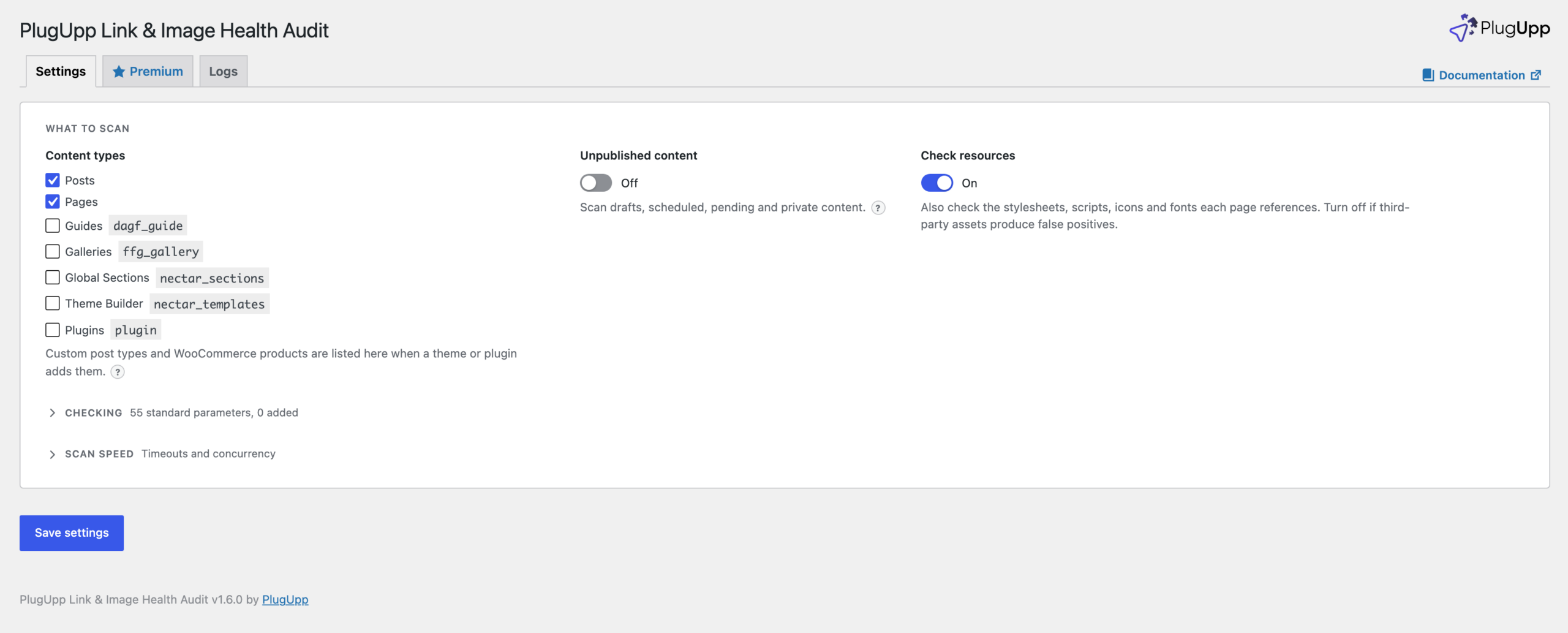
The plugin checks the links and images your visitors actually see. It renders each of your own pages through the normal front-end pipeline and inspects the final HTML, so links added by your theme, menus, widgets, footers and page builder are checked alongside the ones in your posts, and so are images and page resources such as stylesheets, scripts, icons and fonts.
The first scan covers your posts and pages. Settings lists every content type in one place: tick your custom post types and store products, and switch on Unpublished content to check drafts, scheduled, pending and private posts before they go live. Those are rendered privately for the scan only and never shown to visitors. Password-protected content is never scanned, because there is no way to render it without the password.
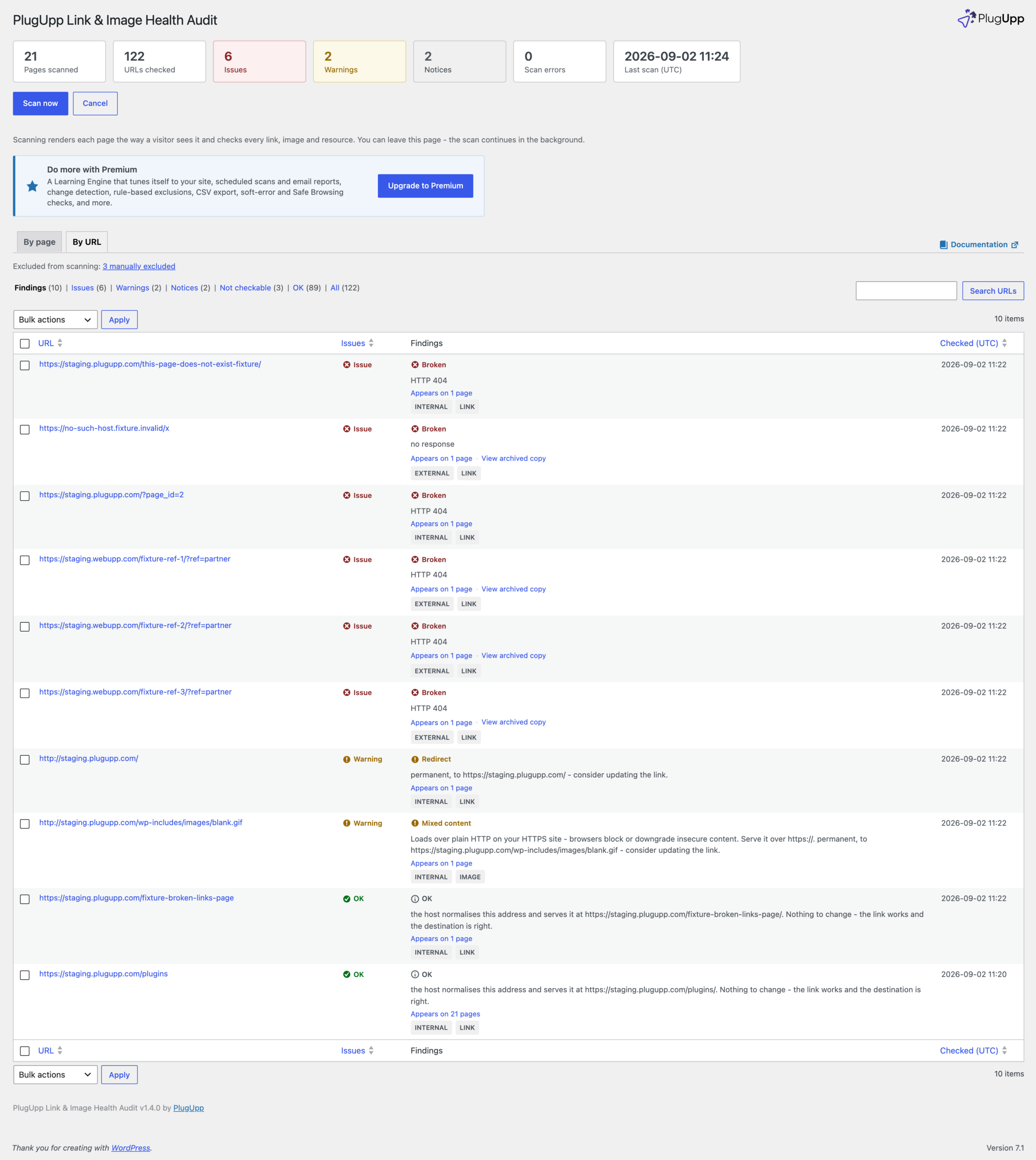
Results come in By page and By URL views, sorted worst-first, with the pages that use each broken link one click away and View source to show exactly where a link sits in the HTML. Every broken external link also carries View archived copy, which opens archived snapshots of the dead page, so you can see what it said or pick a replacement.
A broken link checker you can trust: false positives and soft errors
A report is only useful if what it calls broken is broken. The free plugin is built to keep working links out of your issue count:
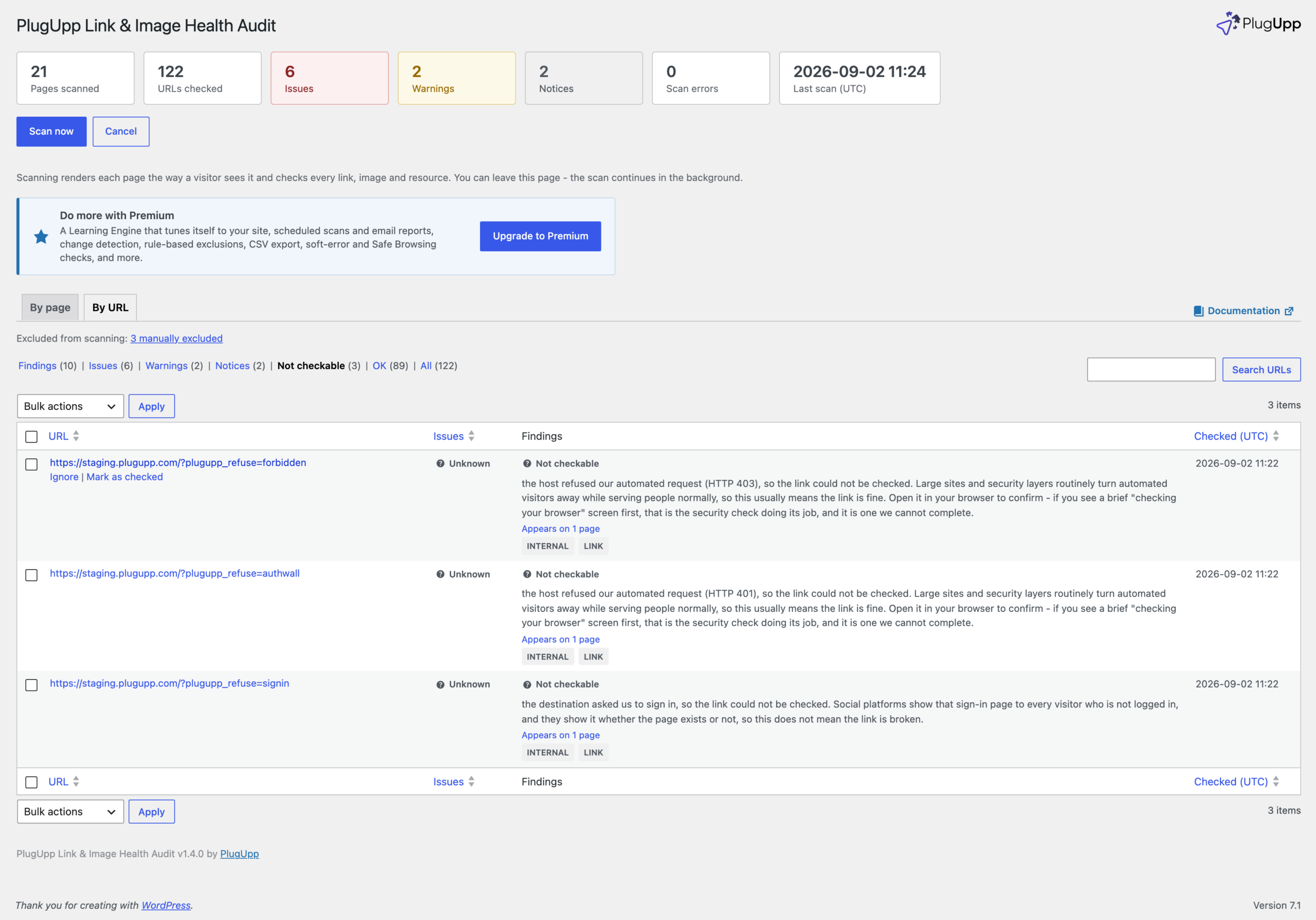
- Hosts that refuse automated visitors are counted separately as Not checkable, never as issues. Review sites, marketplaces, forums and social platforms routinely turn automated requests away while serving people normally.
- Sign-in walls on social platforms are reported as exactly that. Those platforms show the same sign-in page whether a profile exists or not, so those links are worth opening yourself now and again.
- Hosts that refuse a lightweight existence check get a full request before anything is reported as broken.
- Busy hosts that answer too many requests or temporarily unavailable get a second chance: the audit waits, honours the delay the host asks for, and asks again.
- Embeds held back by a cookie banner are checked at their real address, not the placeholder the banner leaves in the page.
Open a Not checkable link, and if it works, click Mark as checked. It then counts as OK. The audit keeps testing it on every scan, so a genuine failure is still reported, and the confirmation lasts six months before it asks you to look again.
Soft errors are the opposite problem: a page that answers 200 OK and is still dead to a reader, such as a parked domain, a for-sale page, a suspended account or an expired-site notice. The free plugin counts a link that resolves cleanly as OK. Soft-error detection, which catches those pages and reports them as issues, is a Premium feature, as are the Safe Browsing check and a browser user-agent for hosts that decide on the user-agent alone.
Scheduled scans, email reports and change detection
Manual scans are free and unlimited. Premium runs them for you: scheduled scans on the schedule you choose, on standard WordPress cron; email reports on every run or only when something needs attention; and change detection, a digest of what newly broke, what changed and what got fixed since the last scan. It also adds rule-based exclusions, one-click filters by issue type and CSV export. Premium is a separate plugin, delivered from plugupp.com, and it still runs entirely on your own server. The plan comparison is on the product page.
Images and mixed content in the same scan
The same scan checks images and page resources as well as links, and flags mixed content on HTTPS sites. Two guides cover those: How to find broken images on a WordPress site, and How to find mixed content on a WordPress site, and fix it.

About the plugin
Link & Image Health Audit
Find broken links, broken images and SSL problems on the pages your visitors actually see.
Rendered-page scanning
Broken links & images
Local & private
Free + Premium versions
